
Updated May 2025 -- All specifications verified. Browse our office chair range
The recline mechanism is the most mechanically complex component in an office chair — and the most frequently misunderstood. Singapore buyers regularly choose between chairs based on upholstery and price, while paying no attention to whether the recline mechanism is a synchro tilt or a standard tilt. This distinction determines whether dynamic sitting is possible or whether the chair locks you into a single static posture for the entire working day.
Why Static Sitting Is the Enemy of Spinal Health
The intervertebral discs of the lumbar spine have no direct blood supply — they receive nutrients and expel waste products through diffusion, a process driven by alternating compression and decompression. In static seated posture, continuous compression without release impairs disc nutrition and waste removal. Research by Holm and Nachemson (foundational disc nutrition studies) demonstrates that disc nutritional exchange requires movement — not just postural variety, but actual dynamic loading cycles.
A chair that enables dynamic sitting — easy postural variation throughout the day — is not a comfort luxury. It is a physiological requirement for spinal disc health during prolonged office work.
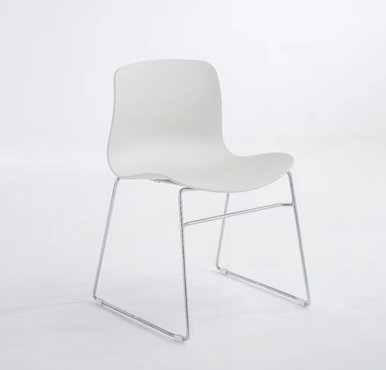
Edmund Stackable Meeting Chair -- from SGD 99 with free islandwide delivery at Linear Furnishings Singapore
Recline Mechanism Types: Detailed Engineering Comparison
| Mechanism | Pivot Point | Foot Behaviour | Lumbar Contact | Best Use Case |
|---|---|---|---|---|
| Fixed backrest | No movement | Flat | Static, cannot optimise | Meeting rooms only |
| Standard/Centre tilt | Under seat rear | Lifts off floor during recline | Breaks contact — lumbar unsupported when reclined | Budget daily chairs |
| Knee tilt | Front of seat pan | Remains on floor | Maintained through recline range | Good ergonomics — step up from standard |
| Synchro tilt (2:1) | Mechanical linkage | Remains on floor | Follows recline — continuous contact | Professional standard — recommended |
| Free float | Multiple points | Remains on floor | Dynamic — moves with body | Active posture users |
Synchro Tilt: Mechanical Detail
The 2:1 synchro ratio is achieved through a four-bar linkage mechanism. The backrest and seat pan are connected to the chair frame through separate pivot points, linked by a coupler bar that constrains their relative movement to the 2:1 ratio. This geometry approximates the natural kinematics of the lumbar-hip-torso complex during reclination: the torso angle changes more than the thigh angle during normal reclination.
Die-cast aluminium mechanisms maintain their dimensional tolerances over years of use; polymer mechanisms undergo creep (gradual dimensional change under sustained load) that slowly increases play in the linkage — producing the metallic rattling sound heard in aging budget synchro chairs.
Tilt Tension: The Most Misused Adjustment
The tilt tension knob adjusts spring pre-load — the force required to initiate recline. Most Singapore office chair users never adjust this control, resulting in either a chair that reclines too easily (any slight movement causes recline — uncomfortable and unsupported) or one that requires excessive force (effectively unusable).
Correct setting protocol: sit in your normal working position with normal posture. Attempt to recline using normal postural movement — not deliberate push-back. The chair should offer noticeable resistance, requiring conscious effort to recline, but without feeling 'locked.' Adjust tension knob until this behaviour is achieved. Most users need to increase tension from the factory setting.
Lock Positions: Why More Is Better
| Lock Positions | Utility | Quality Indicator |
|---|---|---|
| None (free float only) | Dynamic posture only — no fixed working position | Basic mechanism |
| 1 position (upright only) | Can lock upright; cannot lock in reclined positions | Entry-level |
| 3–4 positions | Working posture + one or two rest positions | Standard |
| 5–7 positions | Fine-grained control — work at 95°, rest at 110°, call at 120° | Premium |
| Infinite (ratchet-free) | Lock at any angle — maximum flexibility | Highest specification |
Headrests: Why Most Are Incorrectly Used
The headrest is designed to support the posterior cervical spine (C4–C7 vertebrae) during reclined rest postures. It is not a device for supporting the head during active forward-facing computer work — in this posture, the head should be balanced over the spine without external support.
The most prevalent incorrect headrest use in Singapore: users set the headrest at the level of the occiput (back of the skull) and push their head back to make contact. This forces the cervical spine into extension (chin-up posture). Sustained cervical extension compresses posterior cervical structures and elongates anterior structures — a posture implicated in cervicogenic headache.
Correct Headrest Configuration
- Height: The headrest pad should contact the neck at approximately the level of the top of the ears — the C4–C5 level for most users
- Angle: Tilt slightly forward to maintain contact in the slightly reclined posture where it is used
- When to use: During phone calls, brief rest periods, or reclined review tasks — not during active forward-facing screen work
- When not to use: When working at a screen in forward-facing posture — the head should be balanced, not rested
Headrest Adjustment Mechanism Quality
| Mechanism | Adjustment | Quality Issue | Lifespan |
|---|---|---|---|
| Fixed headrest | None | Suits narrow body size range only | No wear concern |
| Height-only ratchet | Vertical steps | Rattling if ratchet teeth wear | 3–5 years |
| Height + single-axis angle | Vertical + tilt | Adequate for most users | 4–6 years |
| Height + two-axis angle | Vertical + tilt + lateral | Optimum adjustability | 5–8 years |
| Height + angle (locking detent) | Smooth adjustment with positive lock | Best — maintains position without drift | 6–10 years |
Frequently Asked Questions
How do I set the recline tension correctly on my office chair?
Find the tension knob (usually beneath the right side of the seat, sometimes centre-front). Sit in your normal working posture. Try to recline using a relaxed backward lean — not a deliberate push. If the chair reclines easily with minimal effort, increase tension (usually clockwise). If you cannot recline without significant force, decrease tension. The correct setting requires conscious effort to recline but does not feel like forcing against a locked mechanism.
Should I use a headrest while working at a computer?
For active computer work where your eyes are facing the screen: no — the head should be balanced over the spine without support, which promotes active neck musculature use and prevents the postural dependence associated with chronic neck pain. Use the headrest during phone calls, brief rest periods, and when reviewing documents in a reclined posture. This alternation between supported and unsupported postures is the optimal strategy.
My office chair squeaks when I recline. Is it a quality issue?
Squeaking during recline typically indicates one of three things: worn plastic linkage points (replace or lubricate with silicone spray), metal-on-metal contact from worn tolerances (indicates mechanism wear — may be approaching end of life), or a loose fastener (tighten all visible bolts beneath the seat). A quality synchro mechanism should operate silently throughout its lifespan under normal use.